Table of Contents
You publish a page you are proud of, the kind that answers a real question better than anything ranking above you, and then nothing happens. It does not climb in Google, and it does not show up when someone asks ChatGPT or Perplexity the exact thing your page answers. Weeks pass and the page just sits there. We see this constantly, and most owners assume the writing is the problem. Usually it is not. The page is fine. Your site never told search engines or AI models that the page exists or why it matters.
What stalled pages usually mean
When a page refuses to rank or get cited, the instinct is to rewrite it. In most audits we run, that is the wrong fix. The content is rarely the bottleneck. The structure around it is.
A page earns visibility partly through the links pointing at it from elsewhere on your own site. Those links do two jobs. They give crawlers a path to find and re-find the page, and they pass a share of your site’s authority to it. A page with no internal links pointing in is an orphan. Google may know it exists from the sitemap, but it reads that isolation as a signal. If nothing on your own site bothers to reference a page, it probably is not important.
Across the sites we audit, it is common to find that 20 to 40 percent of blog posts have no internal links pointing to them at all. These pages were usually published in a hurry, linked once from a category feed, then forgotten as newer posts pushed them down the archive. They are not bad pages. They are invisible ones. Before touching a single sentence of copy, we map which pages are orphaned, which are buried too deep, and which important pages get almost no internal support. That map usually explains the stall on its own.
Why internal linking decides what ranks and what gets cited
Search engines and AI systems both build a model of your site before they decide what to surface. Internal links are most of how they build it.
For traditional search, three things happen through your internal links. Crawlers discover pages by following them, so a page nobody links to gets crawled late or rarely. Authority flows along them, so a page linked from your strongest pages inherits some of that strength. And the anchor text tells Google what the destination is about, which is why “click here” throws away the most useful signal you have.
Generative engines work differently. Google AI Overviews, ChatGPT, and Perplexity do not rank pages so much as extract passages and assemble answers. To do that well, they need to understand how your pages relate, which one is the definitive answer on a topic, and whether your coverage is deep enough to trust. A tight internal structure, where a main guide links to focused supporting pages and they link back, signals exactly that depth. An orphaned page reads like a one-off with no surrounding context, and AI models lean toward sources that show topical authority across linked content.
The patterns we see most often
The causes repeat from site to site. A handful show up in nearly every audit:
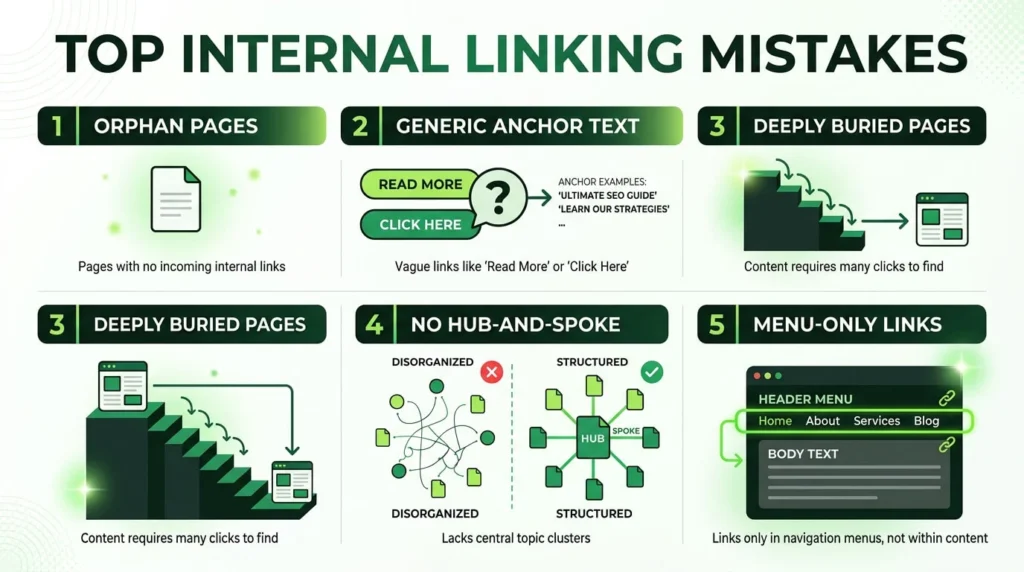
- Orphan pages created by the CMS. A post gets published, appears in one paginated feed, and is never linked from anywhere permanent again.
- Generic anchor text. Dozens of links reading “read more” or “learn more,” none of which tell a crawler or an AI model what sits on the other side.
- Important pages buried four or five clicks deep. If your best service or guide takes that many clicks to reach from the homepage, it gets treated as minor.
- No hub-and-spoke structure. Related posts exist but never link to each other, so a topic that should read as a connected cluster reads as scattered fragments instead.
- Linking that lives only in the menus. Header and footer links help, but contextual links inside the body of your content carry more weight, and those are usually the ones missing.
None of these require new content. They require connecting what you already have, in the right direction, with anchor text that means something.
“Very much enjoyed working with Muhammad. A-star SEO expert! Have and would reccommend.”
How we fix internal linking, step by step
The work is methodical rather than glamorous, and it follows a fixed order.
First, we find every orphan and every page with thin internal support, usually with a crawl tool that reports inbound internal links per URL. That list becomes the priority queue.
Then we group pages into topic clusters. Each cluster gets one main page that covers the subject broadly and several supporting pages that go deep on specific angles. The main page links out to each supporting page, and every supporting page links back to the main one. This single change moves the needle more often than any other.
Next comes anchor text. Every internal link should describe its destination in plain words a person would actually search for, so generic anchors get rewritten to match the target page’s real topic.
After that, we add contextual links from your strongest pages, the ones that already pull traffic or authority, into the priority pages that need help. A few links from a page Google already trusts will do more than a pile of links from weak ones.
We keep important pages within about three clicks of the homepage, and we make sure breadcrumbs are in place, since those are free internal links on every page. A full technical SEO audit checklist covers the indexation and crawl checks that sit alongside this work.
What internal linking changes for GEO
If getting cited in AI answers matters to you, internal structure is not optional. Generative engines reward sources that show clear topical depth, and a connected cluster is the clearest way to demonstrate it.
Descriptive anchor text earns its keep here too. When your link to a supporting page reads “how internal linking affects crawl budget” instead of “this post,” the AI model gets a labelled relationship between two of your pages, which helps it understand the shape of your coverage. Self-contained sections that answer one question, linked sensibly to related answers, are exactly what these systems pull out and cite.
There is a practical step many sites miss. Some block AI crawlers like GPTBot or PerplexityBot in robots.txt without realising it, which means those platforms cannot read or cite the content no matter how well it is linked. We check that in the same pass. Strong internal linking and an open door for the crawlers that matter tend to go together. Our wider approach to [INTERNAL LINK: site architecture and internal linking strategy | site-architecture-internal-linking] connects the two.
“Working with Muhammad and his team has been a key driver in obtaining new leads for our B2B SaaS product. I am extremely happy with his SEO expertise and content writing, and would highly recommend him. For founders looking for a solid GTM strategy or continuing service, Muhammad is your guy!!!”
What to expect, honestly
Internal linking is one of the highest-return fixes in SEO because it improves what you already own, with no new content and no link building. It is also not instant, and it is not a cure for everything.
Once the links are in place, search engines need to re-crawl and re-index the affected pages. That can take a few days to several weeks depending on your site’s size and how often Google visits it. AI systems update on their own schedules, so citations can lag further behind.
We will not promise you a ranking. Anyone who does is guessing. If a page is thin, targets a query nobody searches, or sits on a site with deeper technical problems, internal linking alone will not save it. What we can say plainly is that orphaned and weakly linked pages almost always underperform their potential, and connecting them properly removes a ceiling that was never meant to be there.
Frequently Asked Questions
How many internal links should a page have?
A rough working guide is 5 to 10 internal links per 1,000 words, placed where they genuinely help the reader. The exact number matters less than direction and relevance. One contextual link to a closely related page beats five forced links to unrelated ones. Focus on connecting pages that share a topic, and let the count follow from that.
Will fixing internal links help my pages show up in ChatGPT or Perplexity?
It helps, but it is one factor among several. AI engines favour sources with clear topical depth, and connected clusters signal that depth. You also need the crawlers allowed in robots.txt, content structured into self-contained answers, and visible author and freshness signals. Internal linking strengthens the foundation those other factors build on.
How do I find orphan pages on my site?
Run a crawl with a tool that reports inbound internal links for each URL, then compare that crawl against your XML sitemap or a full URL export. Any page in the sitemap that the crawler reaches only through the sitemap, with zero internal links pointing in, is an orphan. Larger sites usually need a dedicated crawler to surface these reliably.
Is internal linking still worth it if my content is already good?
Yes, and good content is often where it pays off most. A strong page that nothing links to is the most common waste we see. The writing has already done the hard part. The structure just never gave it a path to be found or a reason to be trusted. Connecting it is usually a quick win.
Get a clear answer on what is holding your pages back
If your pages are stalling and you suspect the structure rather than the words, a focused internal linking audit will tell you for certain. We map your orphaned and buried pages, identify the clusters worth building, and hand you a prioritised list of links to add, with the anchor text written for you. Most audits take a few days, and you walk away knowing exactly which connections are holding your best pages back. Send us your site and we will take a look.