
Your traffic dropped, your rankings slid, and the report from your last agency said everything looks “healthy.” We hear this almost every week. A site that ranked fine six months ago quietly loses ground, and nobody can point to the cause because the obvious boxes were already ticked.
The problem is rarely the thing that gets checked first. Most technical SEO audits stop at broken links and missing meta descriptions, then call it done. The issues that actually drag a site down sit one layer deeper, and they are the ones we end up fixing again and again.
What a stalled site usually means
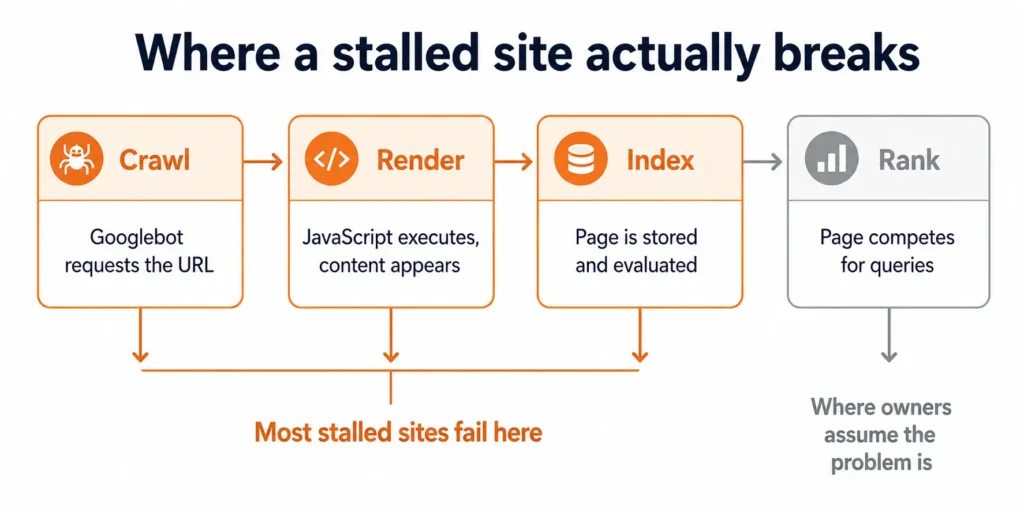
When organic traffic flattens or drops without a clear penalty, the cause is almost always crawl and indexing related, not content quality. In most sites we audit, the pages are fine. Google just isn’t treating them the way the owner assumes it is.
Here is the pattern I see constantly. A site has 400 URLs the owner cares about, but Google has discovered 12,000, most of them filter combinations, session parameters, paginated archives, and tag pages nobody wanted indexed.
Worth being precise about what that does, because the industry is sloppy with the term. Google’s own documentation scopes crawl budget as an advanced concern for sites above roughly a million pages changing weekly, or ten thousand pages changing daily. If you run a 400 page site, crawl budget is not your problem. What you have instead is a selection problem: Google is evaluating thousands of near duplicate URLs, forming a view of the site from the worst of them, and deciding your real pages are not worth prioritising.
The symptom looks like a ranking problem. The cause is an indexing problem. That distinction matters, because no amount of new content fixes a site that is drowning Google in low-value URLs.
The crawl and indexing checks most audits skip
Start here, because this is where the real damage hides. Open Google Search Console and look at the Pages report under Indexing. Pay attention to the “Crawled – currently not indexed” and “Discovered – currently not indexed” buckets.
If those numbers are large relative to your real page count, Google is choosing not to index pages you care about. That is a quality and architecture signal, not a technical glitch you can wave away.
- Index bloat: Thousands of thin or duplicate URLs from faceted navigation, search result pages, or parameter variations. These compete with your real pages and waste crawl budget.
- Orphaned pages: URLs in the sitemap that no internal link points to. Google sees them as low priority because nothing on the site vouches for them.
- Soft 404s: Pages returning a 200 status code while showing little or no real content. Google treats these as wasted crawls and trust erodes.
- Conflicting signals: A page blocked in robots.txt but also listed in the sitemap, or a canonical tag pointing one direction while internal links point another.
The fix is usually subtraction, not addition. Noindex the junk, consolidate duplicates with proper canonicals, and make sure your sitemap only contains URLs you actually want to rank. I have watched sites recover within a crawl cycle once the noise was removed, though timelines depend on how often Google crawls your site to begin with. Google’s guidance on crawl budget management is worth reading if your site is genuinely large. This is the core of what I do in a technical SEO engagement.
Core Web Vitals that fail on the pages that matter
Speed reports get misread all the time. A site scores 90 on the homepage in PageSpeed Insights, the owner relaxes, and the product and category pages that actually convert are scoring 40 on real mobile devices.
Lab scores and field data are not the same thing. The number that affects ranking is the field data Google collects from real Chrome users, shown in the Core Web Vitals report in Search Console. Check that report, not a one-off lab test on your fastest page.
The recurring culprits I find: oversized hero images served without modern formats, layout shift from ads or embeds loading late, and render blocking scripts from tag managers stuffed with tools nobody removed. Largest Contentful Paint and Cumulative Layout Shift are where most sites lose points, and both are usually fixable without a rebuild. I go deeper on which metrics actually correlate with movement in what really affects Core Web Vitals rankings.
Working with Muhammad and his team has been a key driver in obtaining new leads for our B2B SaaS product. I am extremely happy with his SEO expertise and content writing, and would highly recommend him. For founders looking for a solid GTM strategy or continuing service, Muhammad is your guy!!!
Mobile rendering and JavaScript issues you cannot see in a browser
Google indexes the mobile version of your site first. If your content depends on JavaScript that renders after load, you need to confirm Google actually sees the rendered result, not an empty shell.
Use the URL Inspection tool in Search Console and view the rendered HTML, not just the page in your own browser. We regularly find product descriptions, reviews, and internal links that exist for human visitors but are missing from what Google renders. The page looks complete to you and half empty to the crawler.
One thing to check that most 2026 checklists still omit: the crawlers behind AI answers largely do not execute JavaScript the way Googlebot does. A page that depends on client side rendering can be indexed by Google and simultaneously invisible to ChatGPT, Perplexity, and Gemini. If AI visibility matters to you, view source rather than inspect element, and see what is genuinely in the first response.
This is one of the most expensive issues to miss, because the site appears perfect during a casual review. The only way to catch it is to inspect rendered output directly.
Structured data, canonicals, and the signals you are sending by accident
Two sites can have identical content and rank very differently because of the signals their code sends. Canonical tags are the most common place this goes wrong. A misconfigured canonical can tell Google to ignore your best pages in favor of a duplicate or a parameter version.
Check that every important page canonicalizes to itself, that paginated series are handled cleanly, and that your hreflang setup, if you have one, is reciprocal and error-free. Structured data should validate without errors in the Rich Results Test, and it should describe what is actually on the page, not what you wish was there.
A specific one to check on any site running a headless or decoupled front end: confirm the canonical tag exists in the initial HTML response, not just after scripts run. A canonical that appears only after rendering is a canonical Google may never act on.
Muhammad delivered excellent work on this SEO and optimization project, and I truly enjoyed working with him. Over the course of our 8-month collaboration, his strategies led to over 400% increase in customer leads – helping us outperform even larger competitors in our saturated industry. I highly recommend Muhammad, and will absolutely work with him on other projects too when they will come out.
How to run this technical SEO audit checklist in the right order
Order matters more than people expect. Fixing speed before fixing index bloat means you are optimizing pages Google is ignoring anyway. Work from the foundation up.
- First, crawl and indexing: Confirm Google is finding and indexing the right pages and nothing else.
- Second, site architecture: Check internal linking, orphaned pages, and how authority flows through the site.
- Third, rendering: Verify Google sees the same content your visitors do on mobile.
- Fourth, performance: Address Core Web Vitals on the templates that matter, using field data.
- Last, signals: Tidy canonicals, structured data, and any international setup.
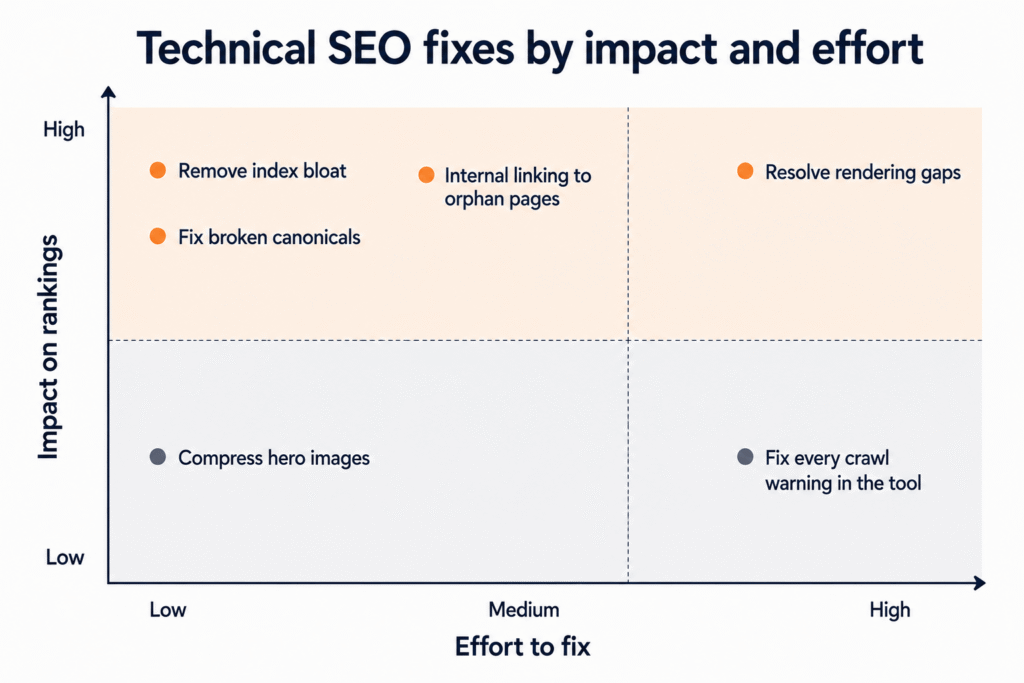
If you want to start with the highest leverage step today, pull up your Search Console indexing report and compare the indexed count to the number of pages you actually want ranking. The gap usually tells the whole story. For the structural side, my guide to internal linking and site architecture fixes covers what to do once you know the gap exists. If the drop was sudden rather than gradual, why your SEO is not working walks through the diagnostic order for that scenario instead.
What Should You Include in a Technical SEO Audit Checklist for Long-Tail Targeting?
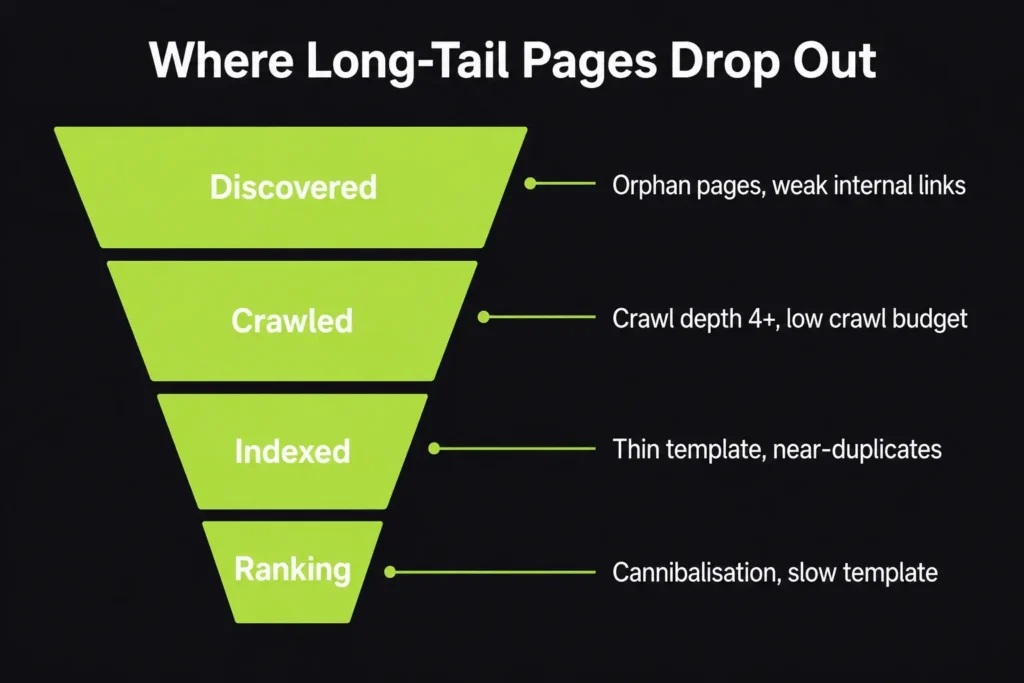
A long-tail audit checks whether search engines can find, crawl, index and tell apart your deepest pages. The core items are crawl depth and orphan pages, indexation coverage per template, segmented XML sitemaps, internal linking to deep URLs, duplicate and near-duplicate control, template-level uniqueness, and query-level cannibalisation checks in Search Console.
A standard audit tells you whether the site is healthy. A long-tail audit tells you whether the bottom 80% of your URLs are actually reachable, and that is a different job. Most sites I audit rank fine for their five head terms and quietly lose hundreds of long-tail queries to crawl depth and duplicate templates.
1. Crawl depth and orphan pages
Long-tail pages usually sit four or five clicks from the homepage. Crawl the site and sort by depth. Anything past click depth three gets crawled less often and updated slower. Pull orphan pages by comparing your crawl against your sitemap and your analytics URL list. Orphans are the single most common reason a long-tail page never picks up.
2. Indexation coverage broken down by template
Do not read the Search Console Pages report as one number. Filter “Crawled – currently not indexed” and “Discovered – currently not indexed” and check which URL patterns dominate. If one template holds 70% of the exclusions, the problem is the template, not the site.
3. Segmented XML sitemaps
Split sitemaps by section or template rather than dumping everything into one file. It costs nothing and it turns indexation into a per-group percentage you can actually track month to month.
4. Internal links pointing at the deep set
Count how many internal links each long-tail URL receives. Anything sitting on one or two links from a paginated archive is starved. Add contextual links from your stronger pages and vary the anchors naturally instead of repeating the exact phrase. This overlaps with on-page work, but the audit part is the link count itself.
5. Duplicate, near-duplicate and canonical handling
Filters, parameters, sort orders and pagination all spawn near-identical long-tail URLs. Check self-referencing canonicals, parameter handling, and whether paginated pages canonicalise to page one (they should not). Run a similarity check across the template to catch pages that differ only by a city or product name.
6. Template-level uniqueness
For programmatic or location pages, measure the boilerplate to unique content ratio. If 90% of the page is shared across 400 URLs, Google treats the set as one page. Unique H1, intro and at least one genuinely page-specific block is the minimum.
7. Query-level cannibalisation
In Search Console, filter queries with four or more words sitting in positions 8 to 25, then check whether more than one URL ranks for each. Two URLs splitting the same long-tail query is a consolidation job, not a content job. This is the same diagnostic I run at the start of any recovery project.
8. Rendering and speed on the deep template
Test rendering on a long-tail URL, not the homepage. If internal links or body content only appear after JavaScript executes, discovery suffers. Run Core Web Vitals on the template that serves the long tail as well, since that is where most of your URLs live. Full detail on both sits on my technical SEO service page.
Frequently asked questions
Q.1: How long does a proper technical SEO audit take?
A thorough audit of a small to mid-sized site usually takes us a few days to a week, depending on size and how messy the indexing situation is. The crawl and analysis are quick. The time goes into verifying rendered output, confirming field data, and separating real problems from noise that looks alarming but does not affect ranking.
Q.2: Why did my traffic drop if my content is fine?
In most cases I see, the content genuinely is fine and the issue is indexing or crawl related. Google may be evaluating your site through thousands of low value URLs, treating your real pages as duplicates, or failing to render content that depends on JavaScript. Content quality is a red herring until the technical signals are sorted.
Q.3: Can I fix these issues myself?
Some of them, yes. Reading your Search Console indexing report and spotting bloat is something any owner can do. Fixing canonicals, faceted navigation, and rendering issues usually needs developer access and an understanding of how the signals interact, because a wrong fix can make things worse than the original problem.
Q.4: Will fixing technical SEO guarantee my rankings come back?
No, and anyone promising that is guessing. Technical fixes remove the things holding a site back so your content can compete on merit. If the underlying content and authority are there, recovery is common. If they are not, technical work alone will not manufacture rankings that were never earned.
Q.5: How often should I run a technical audit?
A full audit once or twice a year is reasonable for most sites, with a quick monthly check of the Search Console indexing and Core Web Vitals reports in between. Run an extra audit after any major change: a redesign, a migration, a CMS switch, or a big content restructure, since those are when new issues quietly appear.
Want to know what is actually holding your site back
If your rankings have stalled and the usual explanations have not added up, the cause is probably sitting in one of the layers above, unseen. Send me your domain and I will run the checks in the right order, then show you exactly what I find in plain language, with the issues ranked by impact so you know what to fix first.
That takes me about a day and costs nothing. You will walk away with a clear picture of what is wrong whether or not you work with me on the fixes. Send me your domain and I will take a look.