Your rankings held steady for years. Then the site got rebuilt, or the blog moved into a new folder, or someone switched on filters across the product pages, and within a fortnight the traffic line fell off a shelf. Nine times out of ten when a business owner sends me that graph, URL structure mistakes sit somewhere in the chain of causes. Not always the whole story, but almost always part of it. The maddening bit is that nothing looks broken. Pages load. The design is fine. Google simply stopped treating them as the same pages it had been ranking.
What a changed URL actually does to a ranking page
A URL is not a label on a page. It is the page’s identity as far as a search engine is concerned. Every link anyone has ever pointed at that page, every bit of history it built up, all of it is attached to that exact string of characters.
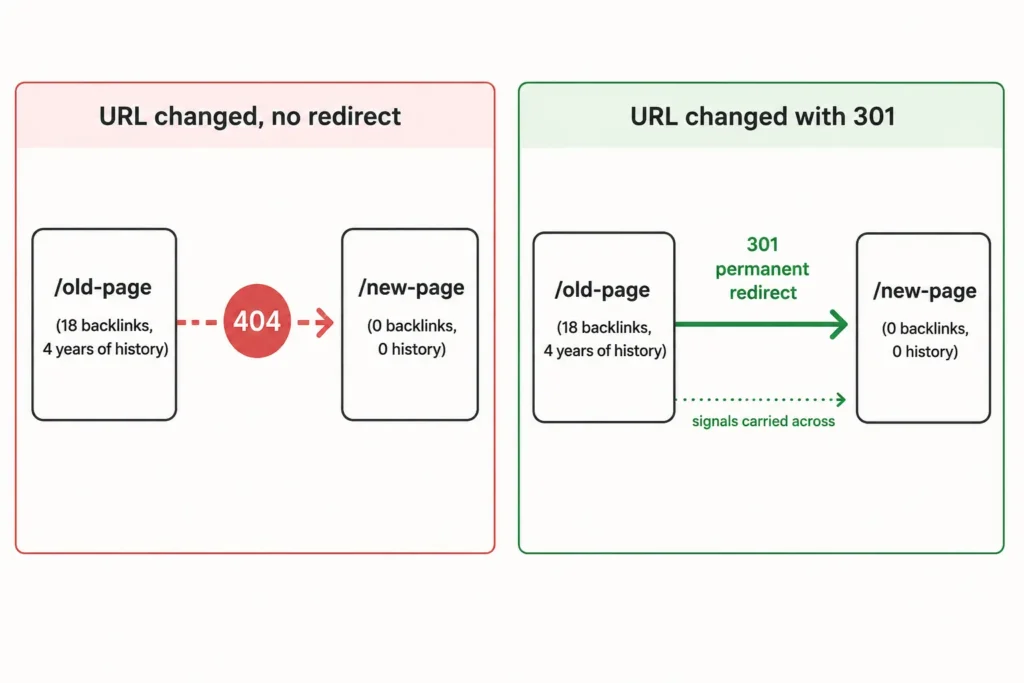
Change the string without telling Google where the page went, and you have not moved a page. You have deleted one and published a brand new one with no history at all. The new page has to earn its position from nothing, which on a competitive term can take months, and sometimes never happens because a competitor filled the gap while you were rebuilding.
This is why the damage is so often delayed. Google keeps serving the old URL for a while out of habit. Then the crawler comes back, finds a 404 or a soft 404, and drops it. The traffic loss shows up two or three weeks after the change that caused it, by which point nobody connects the two events.
The URL structure mistakes I find most often
Across the audits I run, the same handful of faults account for the overwhelming majority of URL related traffic loss. They are rarely exotic.
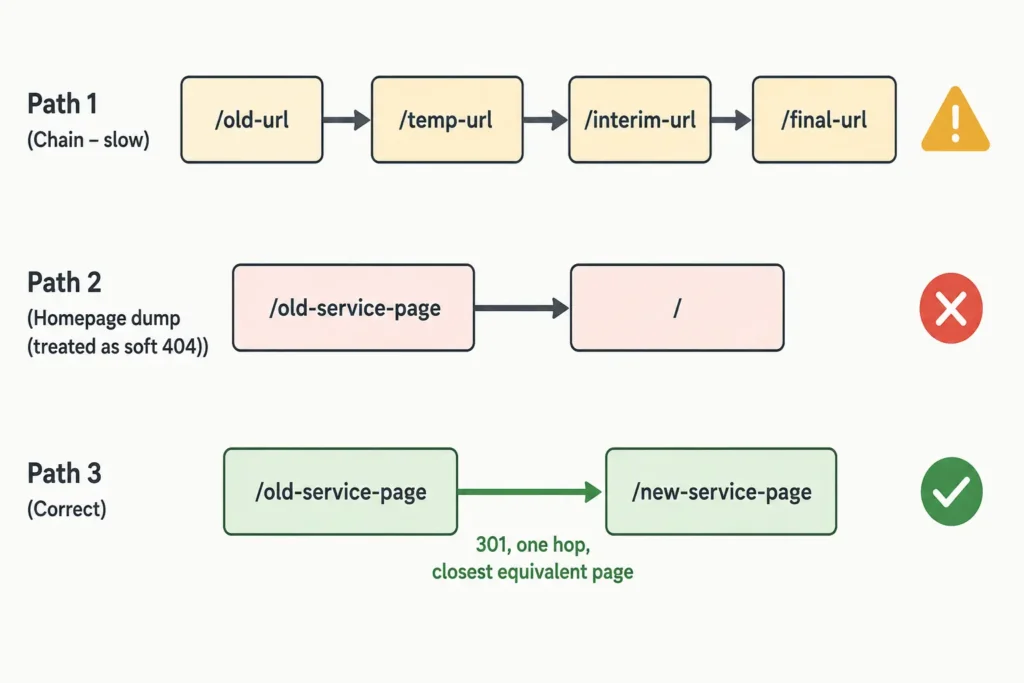
- URLs changed with no redirect, or a redirect to the homepage. Pointing every retired page at the homepage is barely better than doing nothing. Google treats a homepage redirect as a soft 404 in most cases.
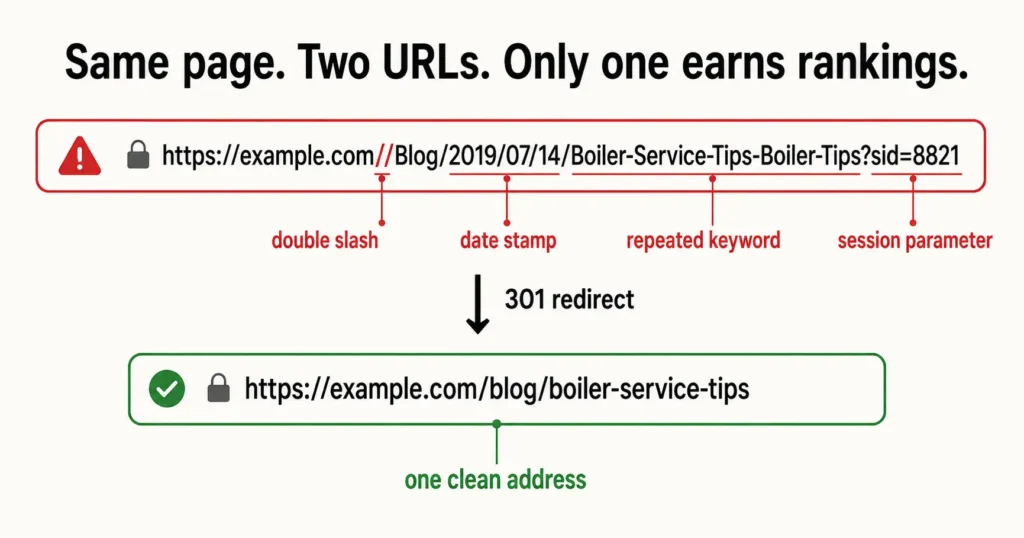
- The same page reachable at several addresses. Trailing slash and no trailing slash. www and non-www. HTTP and HTTPS. Uppercase and lowercase. Each variant is a separate document until you tell it otherwise.
- Parameters spawning URLs without limit. Filters, sort orders, session IDs and tracking tags can generate thousands of near-identical addresses. On large catalogues this is the single most expensive fault I see.
- A malformed URL slipping into the template. Double slashes, unencoded spaces, a relative base tag resolving wrongly, an absolute path that lost its protocol. One bad template variable can produce these at scale.
- Nesting pages five folders deep. Not a direct ranking penalty, but it usually signals a navigation problem, and buried pages get crawled less often.
- Slugs stuffed with repeated keywords.
/plumber-london-emergency-plumber-london-servicesreads as spam to a human and adds nothing for a crawler.
Here is what each of those looks like in practice.
| Problem URL | Fixed version | Why it matters |
|---|---|---|
/Products/Boilers/ and /products/boilers/ | /products/boilers/ only, other version 301’d | Case variants split link signals between two documents |
/shop?color=blue&sort=price&sid=8821 | /shop/blue-boilers/ with parameters canonicalised | Endless parameter combinations drain crawl capacity |
/blog/2019/07/14/boiler-service-tips | /blog/boiler-service-tips | Date stamps make evergreen content look stale in the SERP |
//services//emergency-callout | /services/emergency-callout | Double slashes create a duplicate that no one links to |
/page?id=4471 | /services/emergency-callout | An opaque ID tells nobody, human or machine, what the page covers |
Google’s own URL structure documentation is unusually direct on this: use hyphens rather than underscores, keep words readable, and avoid long parameter strings where a clean path would do. It is one of the few areas where the official guidance is specific enough to act on directly.
The redirect you added may not be doing what you think
Adding a redirect is not the same as adding the right redirect. This is where most well-intentioned fixes fall apart.
A 302 tells Google the move is temporary, so it holds onto the old URL and waits. If the change was permanent, use a 301. Then there are chains, where the old URL points to a second URL that points to a third. Each hop adds latency, and long chains eventually stop passing signals altogether.
The bigger problem is usually the one nobody checks. Ahrefs audited over a million domains and found that internal links pointing at redirected URLs rather than the final destination affect 62.7% of sites. Your redirects can be flawless and your own navigation can still be routing every visitor and every crawler through an unnecessary hop. Fixing how your pages connect to each other matters as much as fixing the redirect map itself.
Muhammad delivered excellent work on this SEO and optimization project, and I truly enjoyed working with him. Over the course of our 8-month collaboration, his strategies led to over 400% increase in customer leads – helping us outperform even larger competitors in our saturated industry. I highly recommend Muhammad, and will absolutely work with him on other projects too when they will come out. ” Alessio Ligabue” – Alessioligabue.it
How to diagnose this yourself in about an hour
You do not need to guess. The evidence is sitting in two places, and comparing them tells you almost everything.
- Pull your indexed URL list from Search Console. The Pages report, filtered to “Not indexed”, shows you exactly which addresses Google has given up on and why. Look for spikes in “Not found (404)” and “Page with redirect” that line up with the date of your rebuild.
- Crawl the live site. Screaming Frog’s free tier handles 500 URLs and will surface response codes, chains, canonical mismatches and duplicate titles in one pass. Anything beyond that size needs the paid version or an equivalent.
- Compare the two lists. Old URLs that earned traffic and now return anything other than a 200 or a single-hop 301 are your priority queue. Sort them by the clicks they used to bring in, not by how many there are.
- Check one page manually. Open a URL that used to rank, view source, and confirm the canonical tag points at itself and not at some leftover staging address. I find staging domains hardcoded into canonicals more often than you would believe.
If you want the full sequence rather than the shortened version, my technical audit checklist walks through the same process with the other crawl and indexing checks attached.
Working with Muhammad and his team has been a key driver in obtaining new leads for our B2B SaaS product. I am extremely happy with his SEO expertise and content writing, and would highly recommend him. For founders looking for a solid GTM strategy or continuing service, Muhammad is your guy!!! – Brandon
What you can realistically expect after fixing it
I want to be plain about this, because the recovery stories you read online are selective.
If the URLs changed recently and you restore proper 301s to the closest equivalent pages, most sites see rankings return over roughly four to eight weeks as Google recrawls and reconsolidates. Larger sites take longer simply because there is more to recrawl.
If the change happened a year ago and the old URLs have long since dropped out, recovery is partial. Some pages come back. Some do not, because a competitor now occupies that position and has been accumulating signals the entire time you were absent.
And if the URL change happened to coincide with a core update, you have two variables moving at once, and anyone who tells you confidently which one caused the drop is guessing. I would rather fix the URL problem, wait for clean data, and then judge. This is often why the SEO work already in progress appears to stall despite everything else being done correctly. On large ecommerce catalogues in particular, a replatform can bury the real cause of a traffic drop under thousands of generated URLs.
What I will not promise is a specific ranking position or a recovery date. Anyone who does is selling something.
FAQ
How do I fix an incorrect URL without losing rankings?
Do not simply change it and republish. Map the old URL to the new one with a 301 permanent redirect, update every internal link to point at the new address directly, submit the updated sitemap in Search Console, and leave the redirect in place permanently. Removing redirects after six months is a common and costly mistake. The signals only transfer while the redirect is live.
What does a malformed URL mean?
A malformed URL is an address a browser or crawler cannot resolve correctly because it breaks the expected format. Common causes include a missing protocol, unencoded characters, double slashes in the path, or a base tag containing an empty value. Crawling tools flag them as errors. They usually come from a template fault rather than a person typing something wrong, which means they appear across many pages at once.
Why do I see %20 in my URLs?
%20 is the encoded form of a space character. URLs cannot contain literal spaces, so anything with a space gets encoded when it is requested. It almost always means a file or page was named with spaces in it. Rename the file using hyphens instead, redirect the encoded version to the clean one, and update any links pointing at the old address.
Should my blog URLs include the date or category?
Dates work against you on evergreen content, because a 2019 stamp in the URL signals age to anyone scanning the results even after you have updated the article. Categories are fine when the site genuinely has distinct sections and you are confident the taxonomy will not change. If there is any chance of restructuring later, a flat structure saves you a migration.
How long before traffic recovers after fixing URL structure?
Four to eight weeks is typical for a small to mid-sized site with correctly mapped redirects, though large sites take longer because Google needs to recrawl more pages. Recovery is rarely a straight line. Expect movement in stages as different sections get recrawled, and judge the result at the eight week mark rather than reacting to week two.
Get a straight answer on what broke
If your traffic dropped after a rebuild, a replatform, or a URL change and you are not certain which one caused it, send me the site and the approximate date things changed. I will crawl it, compare your current URLs against what used to rank, and come back within two working days with a plain list of what is broken, what it is costing you, and what needs fixing first. No deck, no pitch. If the problem turns out to be small enough to handle in-house, I will tell you that.
Send me the details and I will take a look.