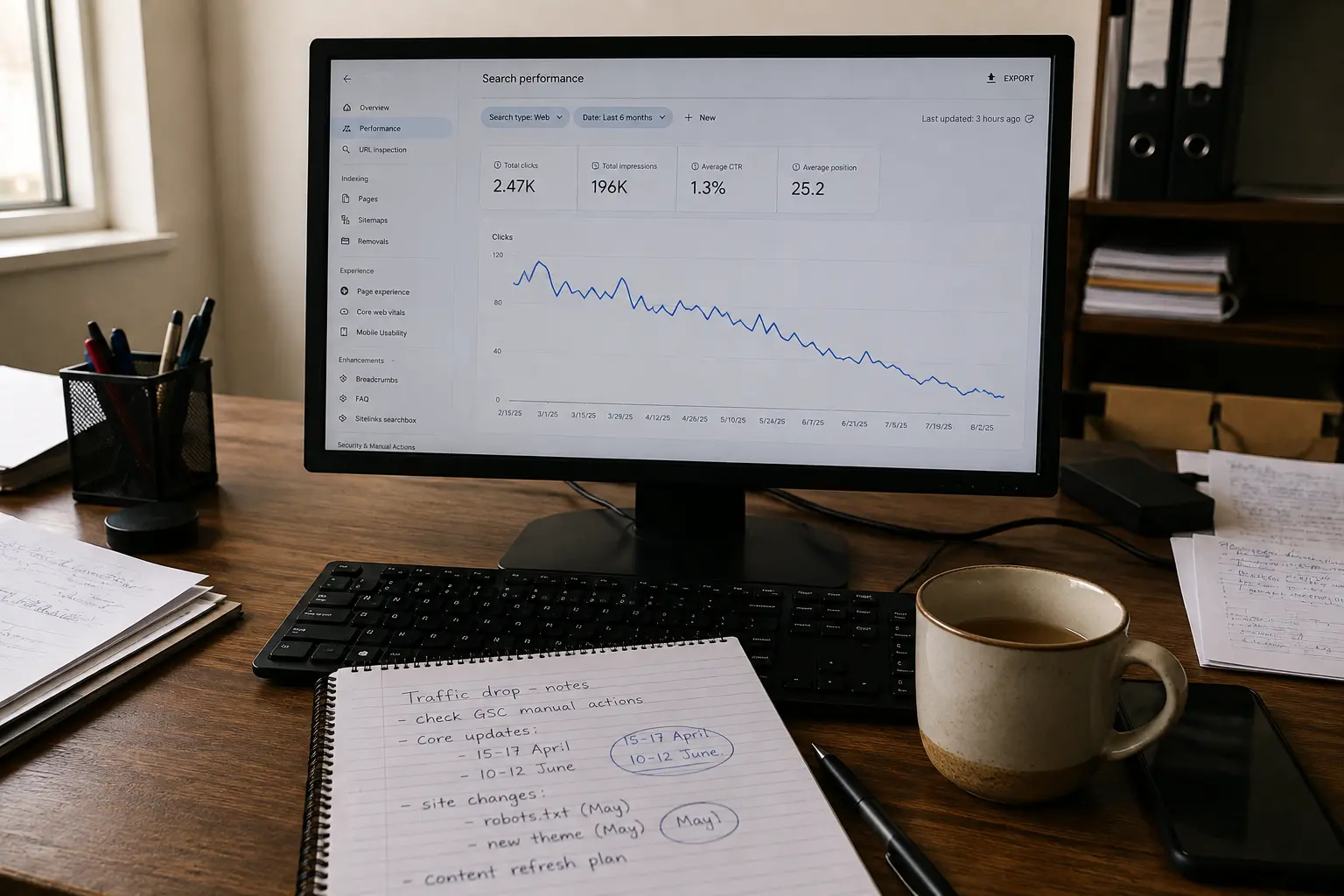
Your traffic dropped, you traced it back to a core update, and now you are weighing WordPattern SEO recovery as the way out. That is a sensible place to start looking. WordPattern is a content decay tool that reads your Google Search Console data and flags pages that are quietly losing position, and early detection is the part most site owners genuinely get wrong.
Detection and recovery are two different jobs. Buying the first does not automatically give you the second. Below is what the tool covers, what it leaves sitting on your desk, and how to tell which one your site actually needs right now.
What a Ranking Drop Usually Means Before You Buy Anything
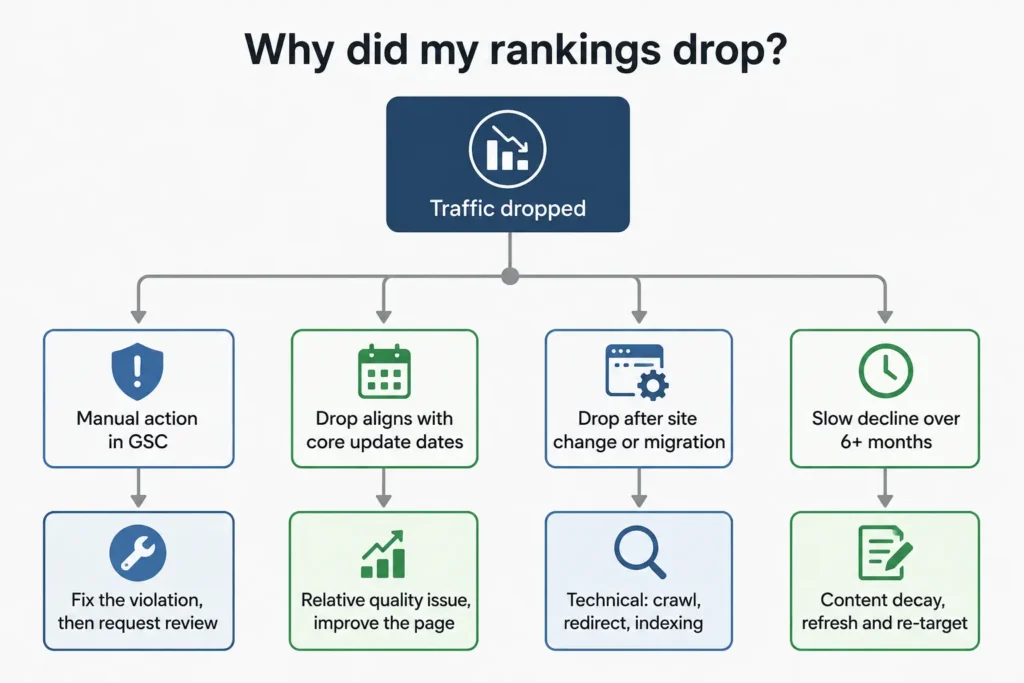
A drop after a core update is not a penalty. Google’s own core updates documentation is direct about this: a page that loses position was not necessarily doing anything wrong, because core updates re-assess how useful your page is relative to everything else competing for that query. There is no rule violation to reverse.
That distinction matters before you spend money. A spam update is a rule check and recovery means fixing the violation, while a core update is a relative assessment where you can comply with every guideline and still lose because another page is now judged more relevant. Different cause, different fix, different timeline. Averi
Timing is the other thing people misread. Google’s Search Status Dashboard recorded the March 2026 core update as starting on 27 March and completing on 8 April 2026, and the May 2026 update ran from 21 May to 2 June. If you started making panic edits mid rollout, you have no clean before and after to measure against. Frase
And the honest part nobody selling software wants to say out loud: Google’s guidance is that recovery often arrives with a future update rather than an immediate fix, and that the biggest change would come after another core update. You can read that guidance yourself in Google’s core updates documentation.
What WordPattern Actually Does
Reading WordPattern’s published material, the product is narrow by design, and that is a compliment rather than a criticism. It connects to Google Search Console, analyses 90 days of performance data to find consistent downward trends across large sets of articles, and identifies which specific paragraphs are outdated rather than only flagging the page. wordpattern
The second half of the product is the AI refresh layer. It generates a refreshed draft with entity suggestions that you approve and push through a WordPress or Shopify integration, or export manually, and the pull from Google is read only, so it cannot alter your site settings.
On core update work specifically, the tool maps your volatility against update windows to separate normal fluctuation from real decay, and frames core update losses as a semantic gap where competitors are using entities your legacy content is missing. Search Engine Land
That framing is right some of the time. It is not right all of the time, and that is where the money gets wasted.
Where a Content Decay Agent Helps, and Where It Stops
I have audited enough dropped sites to notice a pattern in what people expect automation to solve. Here is the split as I see it.
| What happened to your site | Will a decay tool catch it? | Who fixes it |
|---|---|---|
| Old posts sliding 2 to 3 positions a month | Yes, this is its core strength | Tool, with human review of the draft |
| Missing entities competitors now cover | Yes | Tool suggests, you approve |
| Manual action showing in Search Console | No | Human, plus a reconsideration request |
| Two of your pages competing for one query | Rarely, GSC trends look like decay | Human, consolidate or re-target |
| Backlinks lost or devalued | No, it reads performance not links | Human, off-page work |
| Crawl, redirect or indexing failure after a migration | No, it sees the symptom not the cause | Human, technical fix |
| AI Overviews absorbing the click at stable rank | Partially, impressions hold while clicks fall | Human, intent and format rework |
The pattern in that table is consistent. A decay agent is excellent at telling you a page is bleeding. It is not built to tell you why, when the why sits outside the content layer.
That is worth sitting with, because refreshing a page that dropped for a technical reason does nothing at all. You get a rewritten article, a fresh publish date, and the same flat graph four weeks later.
The Causes I Find Most Often, in Order
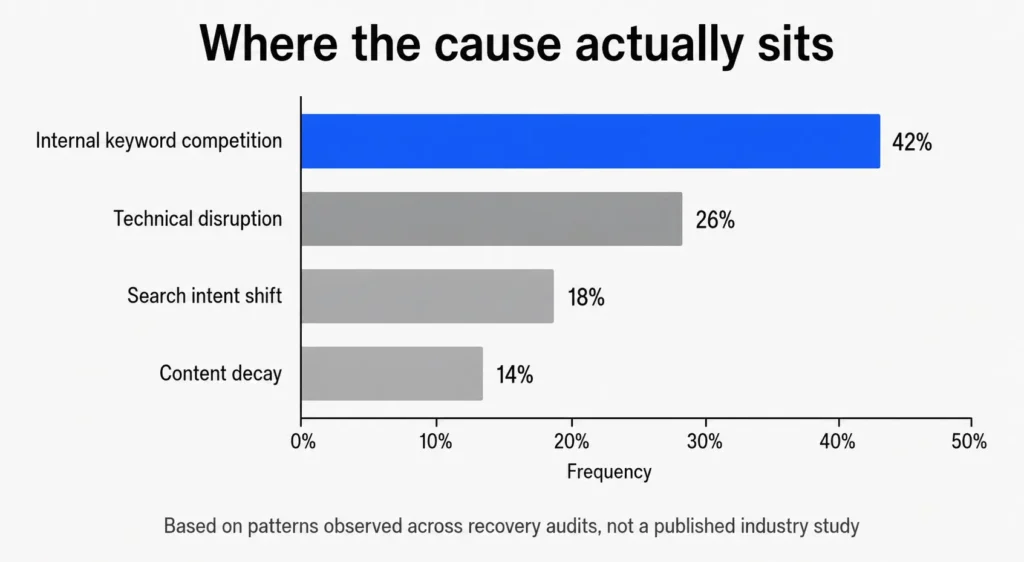
Across the recovery audits I run, content quality is rarely the first thing that broke. It is usually the third or fourth.
- Internal competition. Two or three pages targeting near identical queries, splitting signals until Google picks the weakest one. This looks exactly like decay in a trend graph, which is why automated tools misread it.
- Technical disruption after a change. A redirect chain from a redesign, a canonical pointing at the wrong version, a noindex left in place after staging.
- Intent drift. The query still exists but what people want back from it has moved, often toward comparison or answer style formats.
- Genuine content decay. Outdated facts, thinner coverage than the current top results, missing entities. This is the one WordPattern is built for.
If your situation is the fourth item, a decay tool is a reasonable buy. If it is one of the first three, the tool will keep suggesting rewrites for a problem that rewriting cannot touch. I have written more on that failure mode in why your SEO is not working, and the technical checks I run first are in technical SEO audit checklist.
Judging the Vendor Claims
WordPattern’s site carries testimonials citing outcomes such as a 22% recovery in lost organic traffic within 60 days, and traffic restored within a single crawl cycle after a core update. Treat those the way you would treat any vendor case study: they are unverified, the sites are unnamed, and no attribution model is shown.
The claim I would push back on hardest is speed. Recovery inside one crawl cycle contradicts Google’s own position that meaningful movement usually waits for a subsequent core update. It is possible on a page that dropped for a fixable technical or relevance reason. It is not a reasonable expectation to set for a site that lost visibility across a whole category.
None of this makes the tool bad. It makes the marketing normal. Judge it on the detection layer, which is the part that is verifiable within a week of connecting your Search Console.
“Working with Muhammad and his team has been a key driver in obtaining new leads for our B2B SaaS product. I am extremely happy with his SEO expertise and content writing, and would highly recommend him. For founders looking for a solid GTM strategy or continuing service, Muhammad is your guy!!!” – Brandon Parham- Cleri (USA)
Tool, Consultant, or Both
Here is the split I would suggest, plainly.
Buy the tool if you run a large content library, publish often, and your problem is maintenance at volume. Watching 800 legacy posts by hand does not work, and software that flags the ones losing momentum inside 48 hours pays for itself in attention alone.
Get a diagnosis first if your drop was sudden, sitewide, or tied to a specific date. Something broke, and a paragraph refresh is not the answer. This is the case my SEO recovery service exists for, because the work starts with finding the cause rather than rewriting whatever the tool flags. The same applies if you have already refreshed content once with no movement, since that usually means the cause was never in the content.
Do both if you have a diagnosed content problem across many pages. Diagnosis sets the direction, the tool handles the volume. That combination works well, and it is the only sequence I would recommend in that order.
Frequently Asked Questions
Q 1. Does WordPattern recover rankings after a core update on its own?
It can help if the cause was genuinely a content gap. It monitors Search Console, detects decline patterns, and drafts paragraph level refreshes for you to approve. What it cannot do is diagnose a manual action, a crawl failure, or two of your own pages competing for the same query. Those show the same downward line in a trend graph but need entirely different fixes.
Q 2. Is AI refreshed content risky for SEO?
Google evaluates content on quality rather than production method, so AI assistance is not a violation by itself. The risk is volume without judgement. Refreshing a page that never had a content problem adds nothing, and mass rewriting your strongest pages can lose the specifics that earned them rankings. Review every draft before it goes live, and change nothing on pages that are performing.
Q 3. How long should SEO recovery take?
It depends on the cause, and anyone who quotes you a fixed number is guessing. Technical fixes such as a bad canonical or a blocked path can show movement within a crawl cycle. Quality related drops after a core update often wait for the next core update before improving meaningfully, which historically runs every three to four months.
Q 4. Do I still need this if I already have Ahrefs or Semrush?
Possibly not. Both give you rank tracking and site audits, and both will show you declining pages if you build the reports. What a decay specific tool adds is monitoring by default across a large library with alerts, rather than reports you have to remember to run. That is a workflow advantage on big sites and close to redundant on small ones.
Q 5. What should I check first if traffic dropped this week?
Open Search Console and check for a manual action before anything else. Then compare the drop date against known update windows. Then check whether impressions fell alongside clicks, because stable impressions with falling clicks points at result page changes rather than a ranking loss. Only after those three checks does a content refresh become the sensible next move.
Before You Automate, Find Out What Broke
If you are not certain which of the four causes above applies to your site, a tool subscription is a guess with a monthly fee attached. Send me the URL and the week your traffic changed and I will run a recovery diagnosis: Search Console review, update window correlation, crawl and index checks, and internal competition mapping. You get a written list of what caused the drop and what to fix in what order, usually within three working days. If content decay turns out to be the cause, I will tell you that plainly, and automation may well be the right buy.